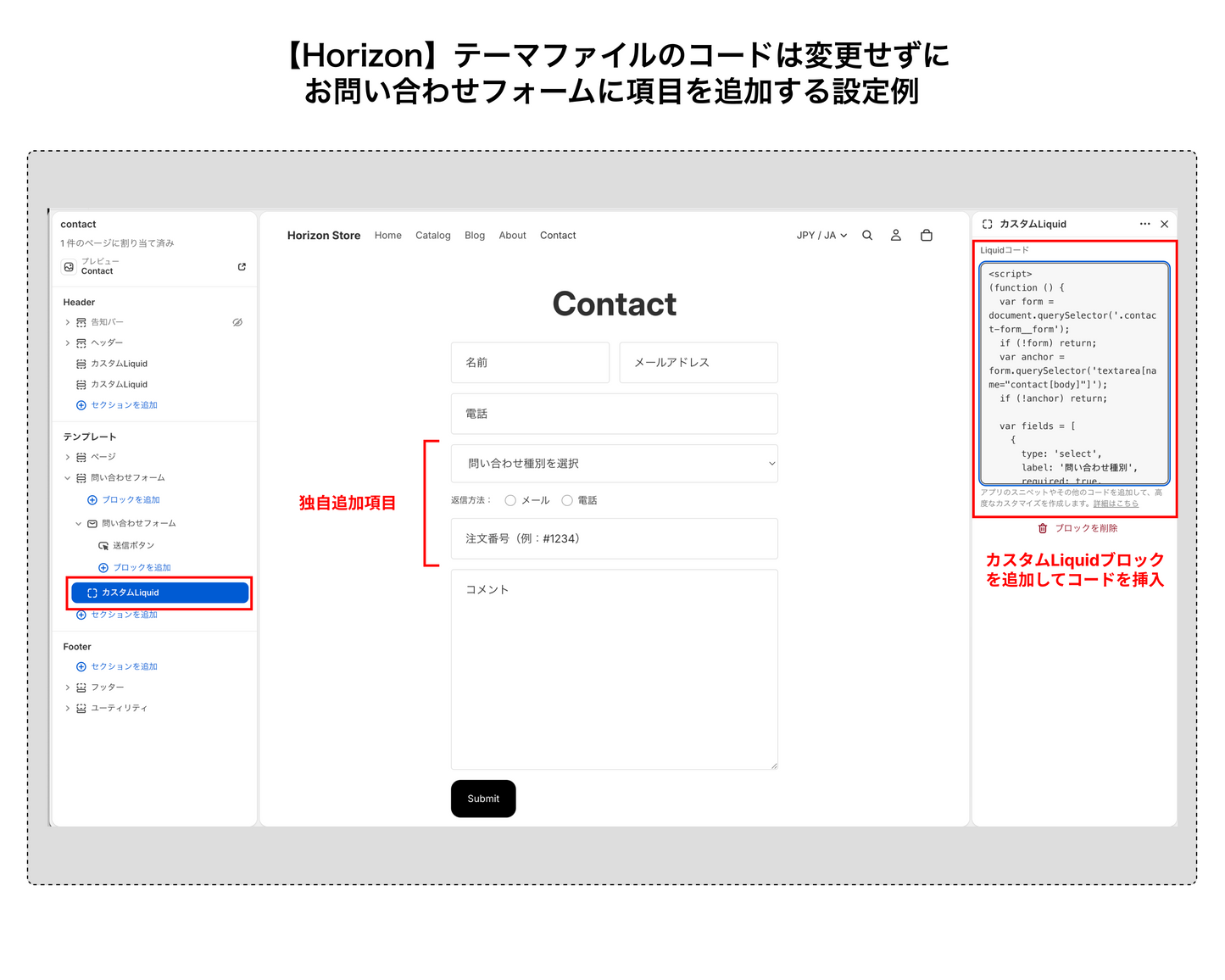
Adding custom fields like "Inquiry Type" or "Order Number" to Horizon's contact form normally requires editing theme files. This TIPS shows you how to add fields using only a Custom Liquid block in the Theme Editor — no theme file changes required. Updates to the Horizon theme won't affect your customization.
How It Works
You can add a Custom Liquid block alongside the contact form block within the same section. JavaScript in that block finds .contact-form__form on page load and dynamically inserts the fields. Since inserted elements are inside the form's DOM, Shopify processes them as contact[field name] and includes them in notification emails.

Steps
- Shopify Admin → Themes → Customize
- Open the Contact page
- Select the contact form section in the left panel
- Click "Add block" → "Custom Liquid"
- Paste the code included after purchase and save
Code (Included After Purchase)
Edit the fields array in the code to freely change which fields are added.

Customizing the fields Array
One object = one field. Add or remove entries freely — fields are inserted in array order, just before the message textarea.
Example 1: Phone number only
var fields = [
  { type: 'tel', label: 'Phone number', placeholder: 'e.g. 090-1234-5678', pattern: '[0-9\\-]*' }
];
Example 2: Inquiry type + order number
var fields = [
  {
    type: 'select',
    label: 'Inquiry type',
    required: true,
    options: ['About a product', 'Order / shipping', 'Returns & exchanges', 'Other']
  },
  { type: 'text', label: 'Order number', placeholder: 'Order number (e.g. #1234)' }
];
Example 3: Full configuration — select, radio, text (default in purchase code)
var fields = [
  {
    type: 'select',
    label: 'Inquiry type',
    required: true,
    options: ['About a product', 'Order / shipping', 'Returns & exchanges', 'Other']
  },
  {
    type: 'radio',
    label: 'Preferred reply',
    options: ['Email', 'Phone']
  },
  { type: 'text', label: 'Order number', placeholder: 'Order number (e.g. #1234)' }
];
Supported Field Types
| type | Input element | Key properties |
|---|---|---|
select |
Dropdown | label / required / options (array) |
radio |
Radio buttons | label / options (array) |
text |
Text input | label / placeholder / required |
tel |
Phone number input | label / placeholder / pattern |
Insertion Position
Fields are always inserted just before textarea[name="contact[body]"]. This selector is fixed in Horizon's standard implementation, so the position remains stable across theme updates.
Notes
- Add the Custom Liquid block inside the contact form section: Adding it to a different section means
.contact-form__formwon't be found. - The label value becomes the field key in notification emails: Fields are submitted as
contact[Inquiry type], so use clear, descriptive names. - No impact from theme updates: Since no theme files are modified, this customization survives Horizon updates.
- Required validation:
required: trueon a dropdown triggers the browser's native validation.